
Track Your Media with Ease
Overview
The software serves as a personal media tracking utility, designed to help users analyze their consumption habits across films, books, and music. By leveraging data from the user’s public profile on Douban, it generates statistical insights based on collected items. This tool is particularly useful for individuals who want to reflect on their cultural preferences, track annual reading or viewing trends, or simply gain a clearer picture of their media consumption over time.
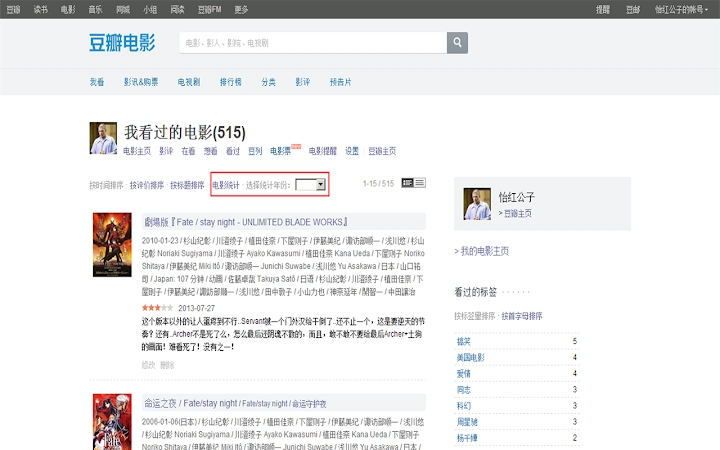
It targets casual users and enthusiasts who maintain a presence on Douban and value data-driven self-reflection. The tool does not require installation—it operates through a browser-based interface, making it accessible across multiple platforms. Users simply input their Douban profile URL, select a year, and receive a summary of their collected media.
While the developer has not provided additional background information, the tool’s consistent updates suggest active maintenance. Real-world applications include personal journaling, content curation, and even academic or creative projects that rely on consumption patterns. The tool’s lightweight nature and minimal setup make it ideal for users seeking quick, insightful results without complex configurations.
Key Features & Capabilities
- Multi-Media Tracking – Supports statistics for films, books, and music collected on Douban, enabling users to monitor all three categories from a single interface.
- Year-Based Filtering – Allows users to select specific years to analyze consumption trends, providing a focused view of their media habits over time.
- Automated Data Processing – Automatically scrapes and processes public Douban collection data, reducing manual effort in compiling personal statistics.
- Visual Output Generation – Produces a formatted HTML report with embedded images and links, offering a clean and shareable summary of collected media.
- Improved Image Handling – Updated in version 1.8 to use direct Douban URLs for images instead of external image hosting, ensuring better reliability and consistency.
For example, a user can use the tool to compare their film-watching habits between 2023 and 2024, or analyze how many books they read per quarter. The output can be saved locally or shared via a link, supporting both personal review and community engagement. The tool’s ability to handle diverse media types within one workflow enhances its utility for content creators, bibliophiles, and film buffs.
User Interface, Workflow & Performance
The interface is minimal and functional, built around a straightforward input field and selection options. Users are prompted to enter their Douban profile URL and choose a year for analysis. The workflow is linear and intuitive, with clear visual cues guiding the process. After submission, the tool processes the data and displays the results in a structured HTML format.
Navigation is simple, relying on standard web form elements. The tool does not require any installation or complex setup, which contributes to its ease of use. Performance is expected to be efficient due to its lightweight design and reliance on client-side processing. However, exact performance details were not specified.
Stability is likely maintained through regular updates, with version 1.8 addressing known issues such as broken book cover links. The tool does not consume significant system resources, as it runs in the browser and does not execute background processes. The developer did not specify resource usage details, but the small file size (1.5 MB) suggests a lean footprint.
Compatibility & System Requirements
The software is compatible with Windows, Mac, and Linux operating systems, ensuring broad accessibility across desktop environments. It functions entirely within a web browser, meaning no native installation is required. This cross-platform support makes it suitable for users who switch between devices or work in mixed environments.
The installation size is listed at 1.5 MB, indicating a lightweight deployment. The developer did not specify additional system requirements, such as minimum RAM or CPU specifications. Compatibility information was partially provided, with no mention of browser-specific limitations. Users are advised to ensure their browser supports modern web standards for optimal performance.
Pros and Cons
Pros
- Free to use with no hidden costs
- Supports film, book, and music statistics in one tool
- Simple, browser-based interface with minimal setup
- Regular updates with bug fixes and feature improvements
- Uses official Douban URLs for image links, improving reliability
Cons
- Requires a public Douban profile to function
- Dependent on external website structure (Douban’s layout)
- No offline mode available
- Performance may vary based on internet speed and profile size
- Does not support private or non-Douban data sources
FAQ Section
Is this tool compatible with all browsers?
The tool is designed to work with modern web browsers, but specific browser compatibility details were not provided. Users should ensure their browser supports JavaScript and HTML5 for full functionality.
Is my data safe when using this tool?
The tool accesses only publicly available data from your Douban profile. It does not store or transmit personal information beyond what is required for processing. No login or sensitive data is collected during use.
How often is the tool updated?
Updates are released regularly, with the latest version being 1.8. The developer has demonstrated active maintenance, including bug fixes and improvements to image handling and output formatting.
Can I use this tool without a Douban account?
No. The tool requires access to a public Douban profile to retrieve collection data. It cannot function without a valid Douban user ID and a profile with collected items.
Does this tool work offline?
No. The tool requires an active internet connection to access Douban’s public pages and process the data. It cannot operate in offline mode.
Final Thoughts + CTA
This media tracking tool offers a practical and accessible way to reflect on personal consumption habits across films, books, and music. Its clean interface, regular updates, and multi-category support make it a valuable companion for users invested in their cultural engagement. While limited to Douban data, its focus on usability and reliability stands out in a niche space.
For anyone maintaining a Douban collection and seeking insight into their yearly habits, this tool delivers real value with minimal effort. It’s particularly well-suited for writers, students, and media enthusiasts who appreciate structured self-analysis.
Download Track Your Media with Ease now







